> ## Documentation Index
> Fetch the complete documentation index at: https://onextel-09023014.mintlify.site/llms.txt
> Use this file to discover all available pages before exploring further.
# All Schedule
> See every scheduled message queued across an account, and cancel schedules before they send.
All Schedule lists every message queued to send later, across the whole account rather than one
campaign at a time. It is the single place to confirm what is about to go out — and the place to
stop it if something is wrong.
## View scheduled messages
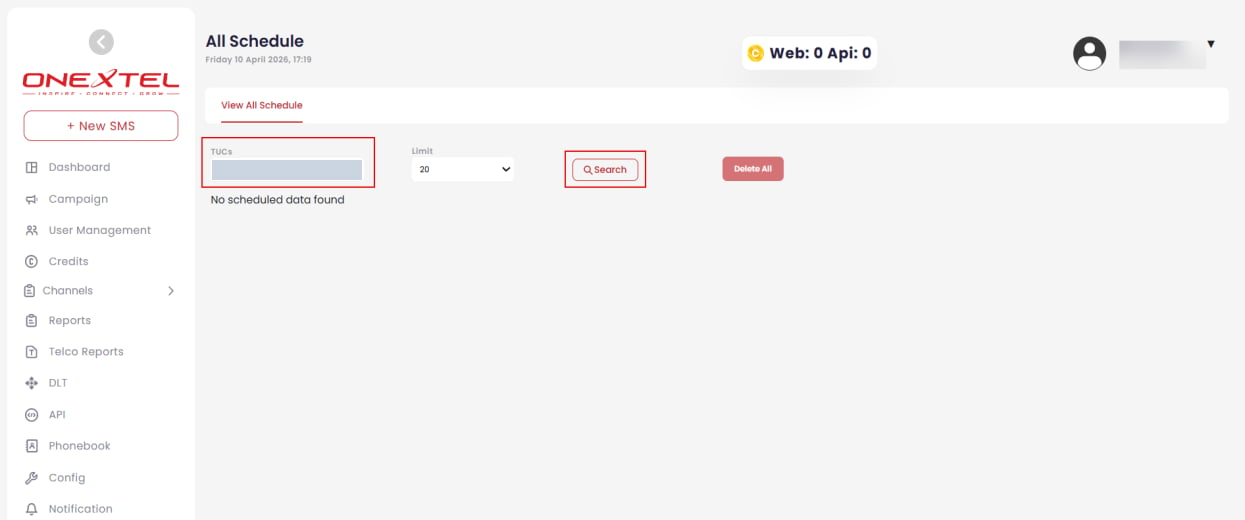
In the left pane, click **All Schedule**.
On the **View All Schedule** tab, select the **TUC** from the dropdown.
Set a record **Limit** if needed, then click **Search**. Scheduled records for that account
are listed. If nothing is queued, the view reports that no scheduled data was found.
 ## Cancel schedules
Use **Delete All** to clear the scheduled records returned by your current search.
**Delete All** cancels every schedule matching the current filter, not just the visible rows,
and a cancelled schedule cannot be restored — it has to be rebuilt in its campaign. Confirm the
TUC selection before using it.
Check this page before any large or time-sensitive send. A campaign scheduled twice, or one left
queued from a test run, is invisible from inside the individual campaign screens but obvious
here.
## Related
* [Schedule and launch an RCS campaign](/guides/rcs-campaigns/schedule-and-launch)
* [SMS campaigns](/guides/sms/campaigns)
* [Platform overview](/guides/platform/overview)
This documentation is built and hosted on [Mintlify](https://mintlify.com), a developer documentation platform.
## Cancel schedules
Use **Delete All** to clear the scheduled records returned by your current search.
**Delete All** cancels every schedule matching the current filter, not just the visible rows,
and a cancelled schedule cannot be restored — it has to be rebuilt in its campaign. Confirm the
TUC selection before using it.
Check this page before any large or time-sensitive send. A campaign scheduled twice, or one left
queued from a test run, is invisible from inside the individual campaign screens but obvious
here.
## Related
* [Schedule and launch an RCS campaign](/guides/rcs-campaigns/schedule-and-launch)
* [SMS campaigns](/guides/sms/campaigns)
* [Platform overview](/guides/platform/overview)
This documentation is built and hosted on [Mintlify](https://mintlify.com), a developer documentation platform.