> ## Documentation Index
> Fetch the complete documentation index at: https://onextel-09023014.mintlify.site/llms.txt
> Use this file to discover all available pages before exploring further.
# API Keys
> Generate and manage the API keys that authenticate API calls, plugin connections, and callback registrations.
An API key authenticates everything that talks to OneXtel from outside the portal — direct
[API](/api-reference/whatsapp/overview) calls, every [plugin](/plugins/overview), and the
[callbacks](/guides/platform/callback-configuration) that report delivery back to you.
Keys are account-level, not channel-level: the same key works across the channels your account
is entitled to.
Callbacks are registered **against a specific key**. Messages sent with a key that has no
callback registered will send perfectly well and report nothing back — so if you issue a second
key for a new integration, remember to register its callbacks too.
## Generate a key
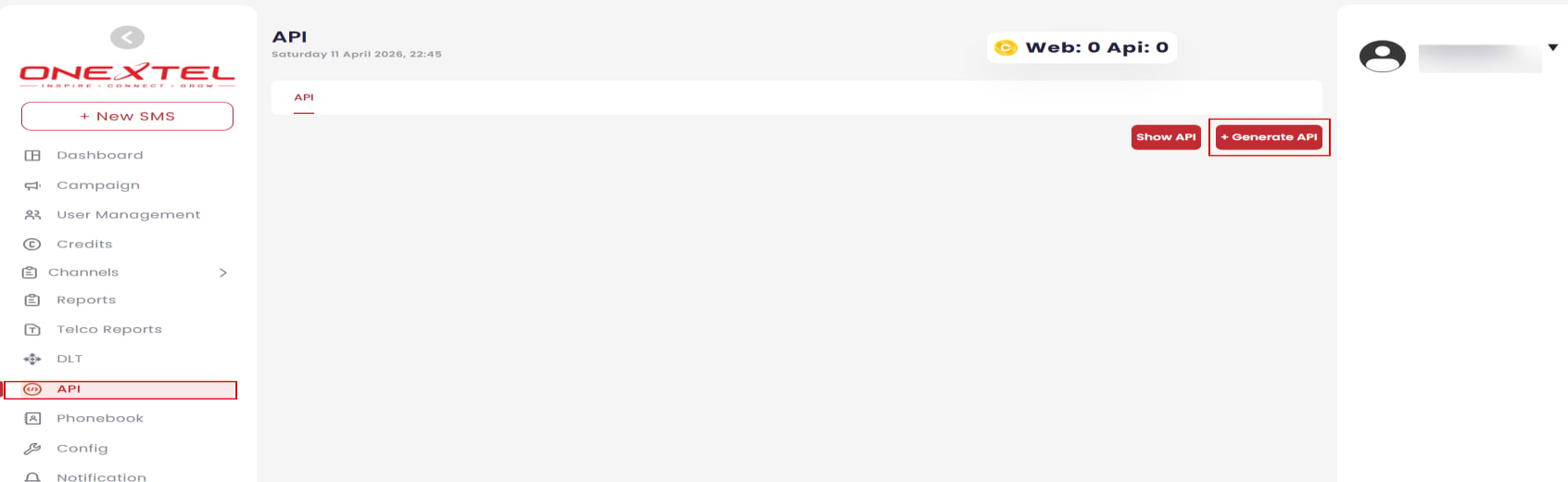
In the left pane, click the **API** menu, then click the **API** tab.
Click **+ Generate API**.
Enter a **Name** and a **description**.
Write a real description. A key labelled only by its creation date is impossible to retire
safely later, because nobody can tell what would break.
Select the **Account Type** for this key.
| Option | Effect |
| - | - |
| Scrub DND | Filters recipients registered on Do Not Disturb |
| Match Template | Requires outbound content to match a registered template |
| IP Whitelist | Restricts use of the key to approved source IP addresses |
| PE-TM Settings | Permits only DLT-approved messages |
Click **Submit**. The platform generates the API key.
**Account type cannot be changed once the key is created.** If you pick the wrong type you will
need to generate a replacement key and re-point every integration using it — including its
callback registrations. Confirm the type before submitting.
**IP Whitelist** is the single most effective control here — a leaked key is unusable from an
unapproved address. Set it for any key used by a fixed server. For [DLT-regulated
sending](/guides/sms/dlt) in India, enable **PE-TM Settings** so unregistered content is
rejected at the platform rather than by the operator.
## View keys
In the left pane, click the **API** menu, then the **API** tab, and click **Show API**. The
platform lists your keys and their details.
 ## Edit a key
Click **API**, then **Show API** to display the keys and their details.
In the **Action** column, click the ellipsis (**...**) icon.
Make your changes and click **Submit**.
## Delete a key
Click **API**, then **Show API** to display the keys and their details.
In the **Action** column, click the **Delete** icon.
Click **Submit**.
Deleting a key immediately breaks every integration authenticating with it, and its registered
callbacks stop firing. Check which plugins and applications use a key before removing it.
## Related
* [Callback configuration](/guides/platform/callback-configuration)
* [Plugins overview](/plugins/overview)
* [Platform overview](/guides/platform/overview)
This documentation is built and hosted on [Mintlify](https://mintlify.com), a developer documentation platform.
## Edit a key
Click **API**, then **Show API** to display the keys and their details.
In the **Action** column, click the ellipsis (**...**) icon.
Make your changes and click **Submit**.
## Delete a key
Click **API**, then **Show API** to display the keys and their details.
In the **Action** column, click the **Delete** icon.
Click **Submit**.
Deleting a key immediately breaks every integration authenticating with it, and its registered
callbacks stop firing. Check which plugins and applications use a key before removing it.
## Related
* [Callback configuration](/guides/platform/callback-configuration)
* [Plugins overview](/plugins/overview)
* [Platform overview](/guides/platform/overview)
This documentation is built and hosted on [Mintlify](https://mintlify.com), a developer documentation platform.