> ## Documentation Index
> Fetch the complete documentation index at: https://onextel-09023014.mintlify.site/llms.txt
> Use this file to discover all available pages before exploring further.
# Telco Reports
> Compare SMS delivery performance across telecom operators and accounts to isolate where messages are failing.
Telco Reports summarises SMS performance broken down by account and sender ID type, showing how
much traffic was submitted, delivered, failed, and is still awaited.
Where the [dashboard](/guides/platform/getting-started#the-dashboard) tells you *that* delivery
is down, this is where you find out *where* — because a delivery problem confined to one
operator or one sender ID type is a different problem from one affecting everything.
## View the report
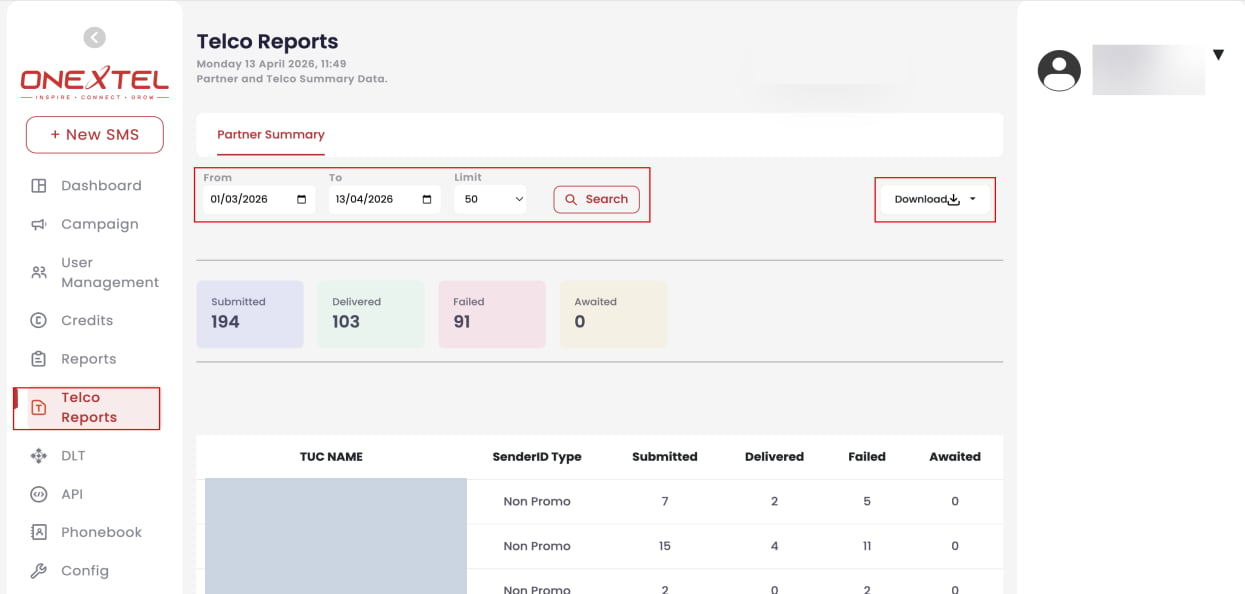
In the left pane, click **Telco Reports**. The **Partner Summary** tab opens by default.
Select the **From date** and **To date** range.
Set the **Limit** if you need more or fewer rows than the default.
Click **Search** to display the report.
Click **Download** to export the data.
 ## Reading the report
Totals appear at the top, with a per-row breakdown by TUC and sender ID type beneath.
| Status | Meaning |
| - | - |
| Submitted | Accepted by the platform and passed onward |
| Delivered | Confirmed as reaching the handset |
| Failed | Rejected or undeliverable |
| Awaited | Sent, with no final status returned yet |
**Awaited** is not the same as failed. A message can sit awaited legitimately — the handset is
off, or the operator has not yet returned a receipt. Awaited counts that stay high over a long
date range, though, usually mean delivery receipts are not coming back at all, which is a
[callback configuration](/guides/platform/callback-configuration) problem rather than a
delivery one.
Comparing Submitted against Delivered per row is the fastest way to spot a route or sender ID
that is underperforming while the account average still looks healthy.
## Related
* [SMS reports](/guides/sms/reports)
* [DLR callback](/api-reference/sms/dlr-callback)
* [Platform overview](/guides/platform/overview)
This documentation is built and hosted on [Mintlify](https://mintlify.com), a developer documentation platform.
## Reading the report
Totals appear at the top, with a per-row breakdown by TUC and sender ID type beneath.
| Status | Meaning |
| - | - |
| Submitted | Accepted by the platform and passed onward |
| Delivered | Confirmed as reaching the handset |
| Failed | Rejected or undeliverable |
| Awaited | Sent, with no final status returned yet |
**Awaited** is not the same as failed. A message can sit awaited legitimately — the handset is
off, or the operator has not yet returned a receipt. Awaited counts that stay high over a long
date range, though, usually mean delivery receipts are not coming back at all, which is a
[callback configuration](/guides/platform/callback-configuration) problem rather than a
delivery one.
Comparing Submitted against Delivered per row is the fastest way to spot a route or sender ID
that is underperforming while the account average still looks healthy.
## Related
* [SMS reports](/guides/sms/reports)
* [DLR callback](/api-reference/sms/dlr-callback)
* [Platform overview](/guides/platform/overview)
This documentation is built and hosted on [Mintlify](https://mintlify.com), a developer documentation platform.