

Scope
- WhatsApp
- RCS
- SMS
| Type | Supported |
|---|---|
| Text | ✅ |
| Image | ✅ |
| Video | ✅ |
| Document | ✅ |
| Location | ✅ |
| Quick Reply buttons | ✅ |
| Call-to-action buttons — static and dynamic | ✅ |
| Type | Supported |
|---|---|
| Text | ✅ |
| Rich Card | ✅ |
| Rich Media | ✅ |
| Suggestions | ✅ |
| Webview | ✅ |
| Audio | ❌ |
| PDF / document | ❌ |
OPEN_URL, DIAL_PHONE, SHOW_LOCATION, QUERY_LOCATION, REQUEST_LOCATION, and
CREATE_CAL_EVENT.SMS fallbackSupported. If RCS is not delivered, OneXtel retries over SMS — see the RCS tab under
Set up.InboundSuggestion interaction callbacks are returned. Inbound messages are not supported —
see Limitations.| Type | Supported |
|---|---|
DLT-registered SMS to India — SI, SE and OTP templates | ✅ |
| Unicode (non-ASCII) text | ✅ |
| Personalization through MoEngage’s message macros | ✅ |
Before you start
- A MoEngage account with the custom-provider channel available. RCS requires MoEngage to register OneXtel as a partner — raise this with your MoEngage account team before starting.
- A OneXtel account with the relevant channels enabled.
- Pre-approved templates in OneXtel. See RCS templates and WhatsApp templates.
- For SMS, and for SMS fallback on RCS, a DLT-registered sender ID, your DLT entity ID, and DLT-approved SMS templates in OneXtel. See DLT registration.
Connector endpoints
Every URL this connector uses sits on one host,https://mo.onexaura.com. Copy them from here
rather than retyping — MoEngage rejects nothing at save time, so a wrong path fails silently at
send.
| Channel | Purpose | Where you enter it | URL |
|---|---|---|---|
| Outbound | MoEngage sender — URL | https://mo.onexaura.com/moengage/whatsapp/outbound | |
| Inbound and button clicks | OneXtel callback — Callback URL | https://mo.onexaura.com/moengage/whatsapp/inbound | |
| RCS | Outbound | MoEngage sender — API URL | https://mo.onexaura.com/moengage/rcs/outbound |
| RCS | Button clicks | OneXtel callback — Callback URL, header callback | https://mo.onexaura.com/moengage/rcs/inbound |
| RCS | Delivery reports | OneXtel callback — Callback URL, header callback | https://mo.onexaura.com/moengage/rcs/dlr |
| SMS | Outbound — plain SMS campaigns, and the provider RCS fallback needs | MoEngage SMS provider — API URL | https://mo.onexaura.com/moengage/sms/outbound |
| SMS | Delivery reports — plain SMS, and the SMS leg of an RCS fallback | OneXtel callback — Callback URL, header callback | https://mo.onexaura.com/moengage/sms/dlr |
callback header. That puts every receipt in the
connector’s logs, which is the only way to tell later whether OneXtel sent a report that MoEngage
did not count.onexaura.com. OneXtel runs other connectors on similar-looking
hosts, so check it before saving.Set up
- WhatsApp
- RCS
- SMS
Get your OneXtel API key
Add OneXtel as a sender in MoEngage
| Field | Value |
|---|---|
| URL | https://mo.onexaura.com/moengage/whatsapp/outbound |
| WABA ID | From the OneXtel dashboard under Channel → WhatsApp |
| Authorization | The API key from step 1 |
| WABA Number | Your registered WhatsApp Business number |
Configure the delivery report callback
WhatsApp and Callback Format Type to MoEngage, and select the same API key you
used in MoEngage.Under Request Configuration, set Type to Delivery Notification and HTTP
Method to POST. Paste the callback URL copied from your MoEngage dashboard, then save.Configure the inbound callback
Incoming and HTTP Method to POST, and
enter this URL:https://mo.onexaura.com/moengage/whatsapp/inbound
callback_url with your MoEngage DLR URL as the
value. Save.Configure the button-click callback
Button Click. The URL, header key, and
header value are all identical to the inbound callback.Part A — Create the RCS sender and configure SMS
Get your OneXtel API key
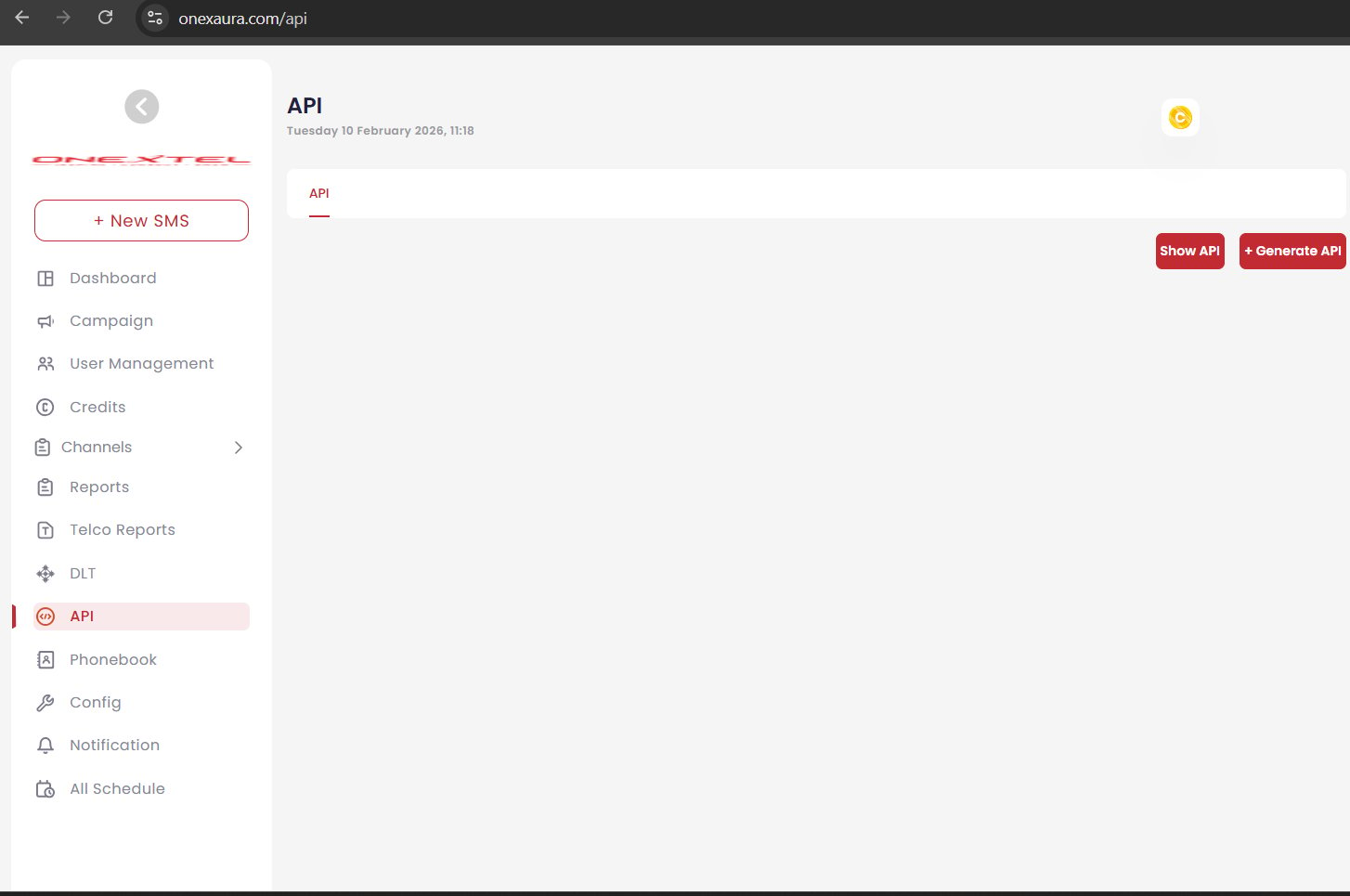
OneXtel API page
Find your RCS sender profile
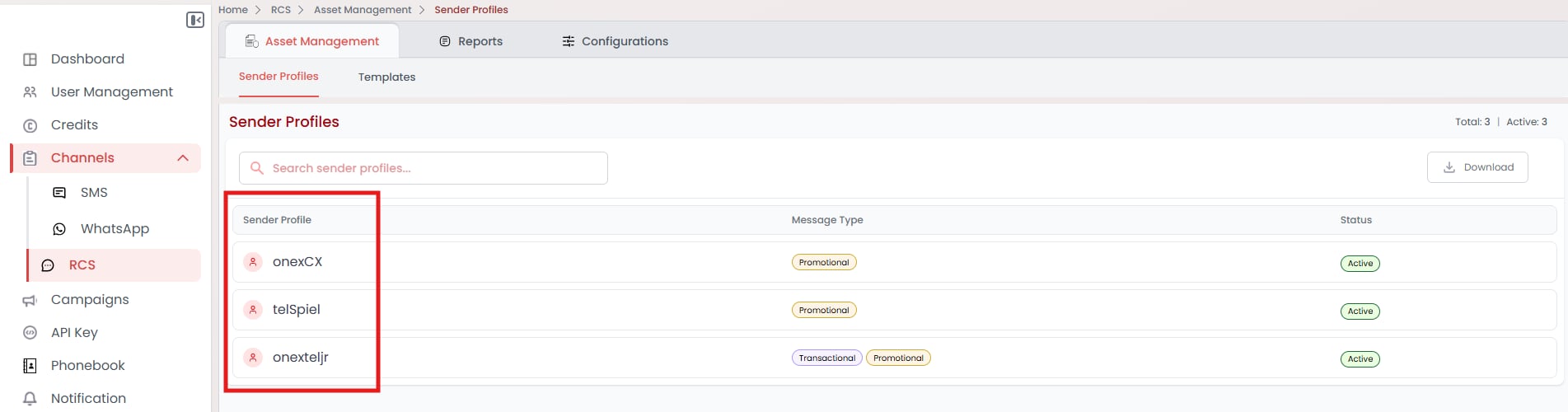
RCS sender profiles in OneXtel
Add OneXtel as an RCS sender in MoEngage
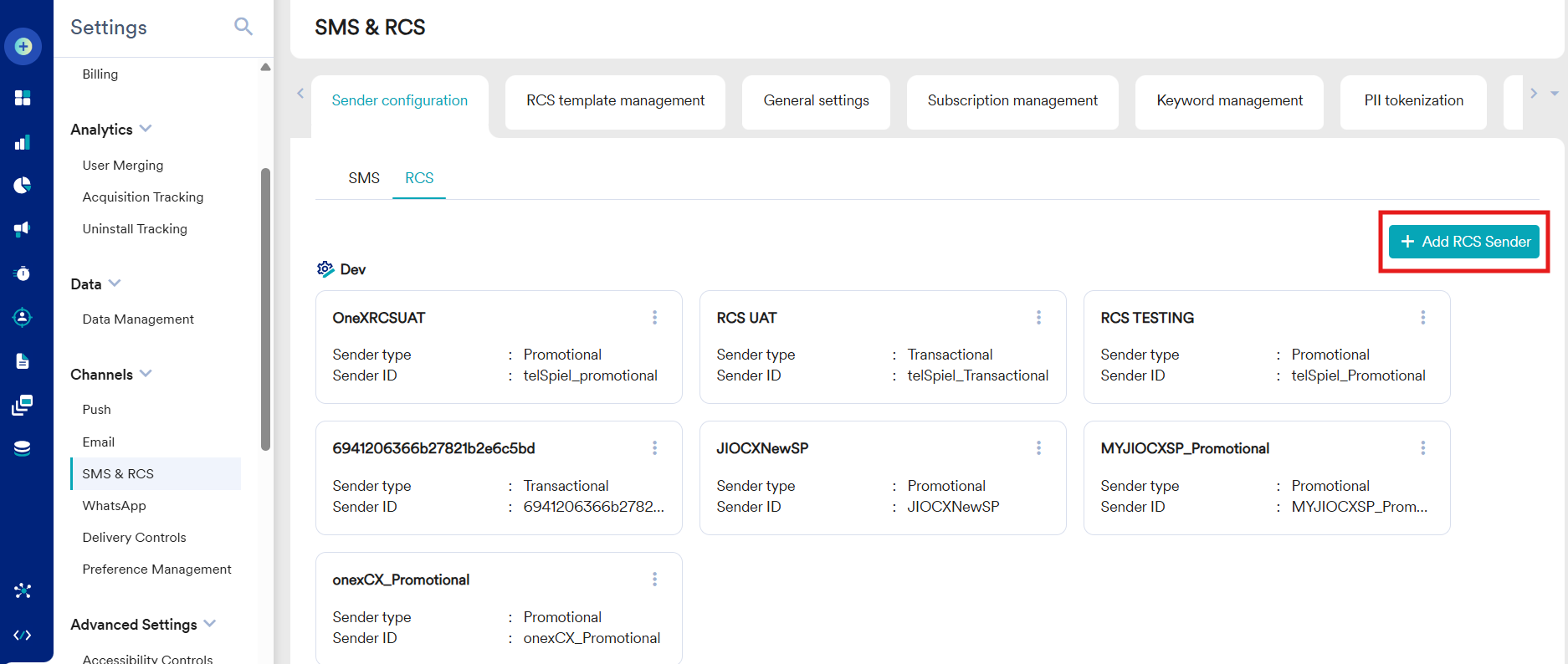
MoEngage SMS & RCS settings, RCS tab
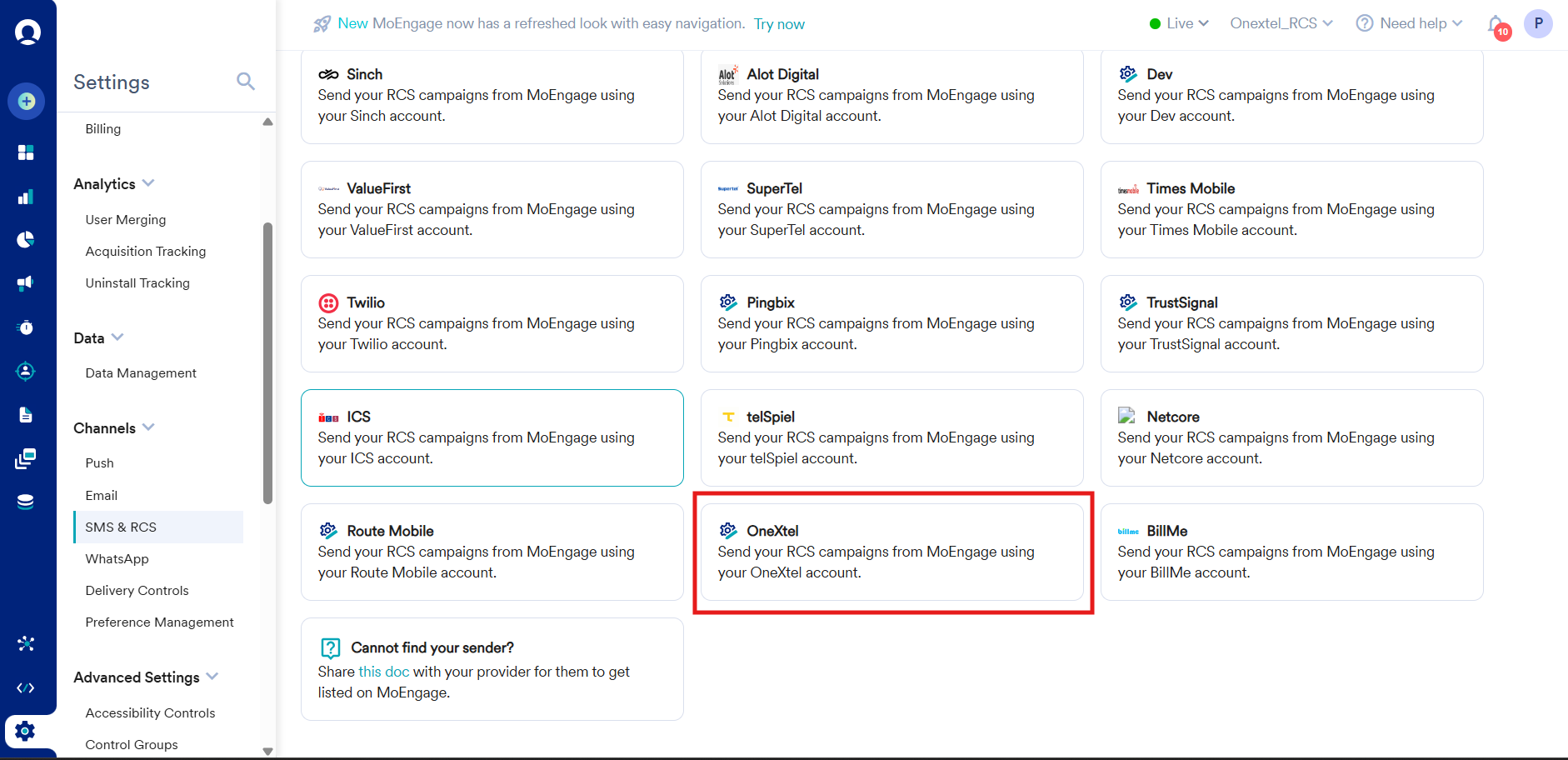
Selecting OneXtel as the RCS provider
Enter the sender details
| Field | Value |
|---|---|
| Sender type | The message type this sender carries — Transactional or Promotional |
| Sender Name | Your sender name, suffixed with the message type |
| Sender ID | Your OneXtel sender profile, suffixed with the message type |
| API URL | https://mo.onexaura.com/moengage/rcs/outbound |
| Authorization | The API key from step 1. To add a TTL or SMS fallback, see the Authorization step below |
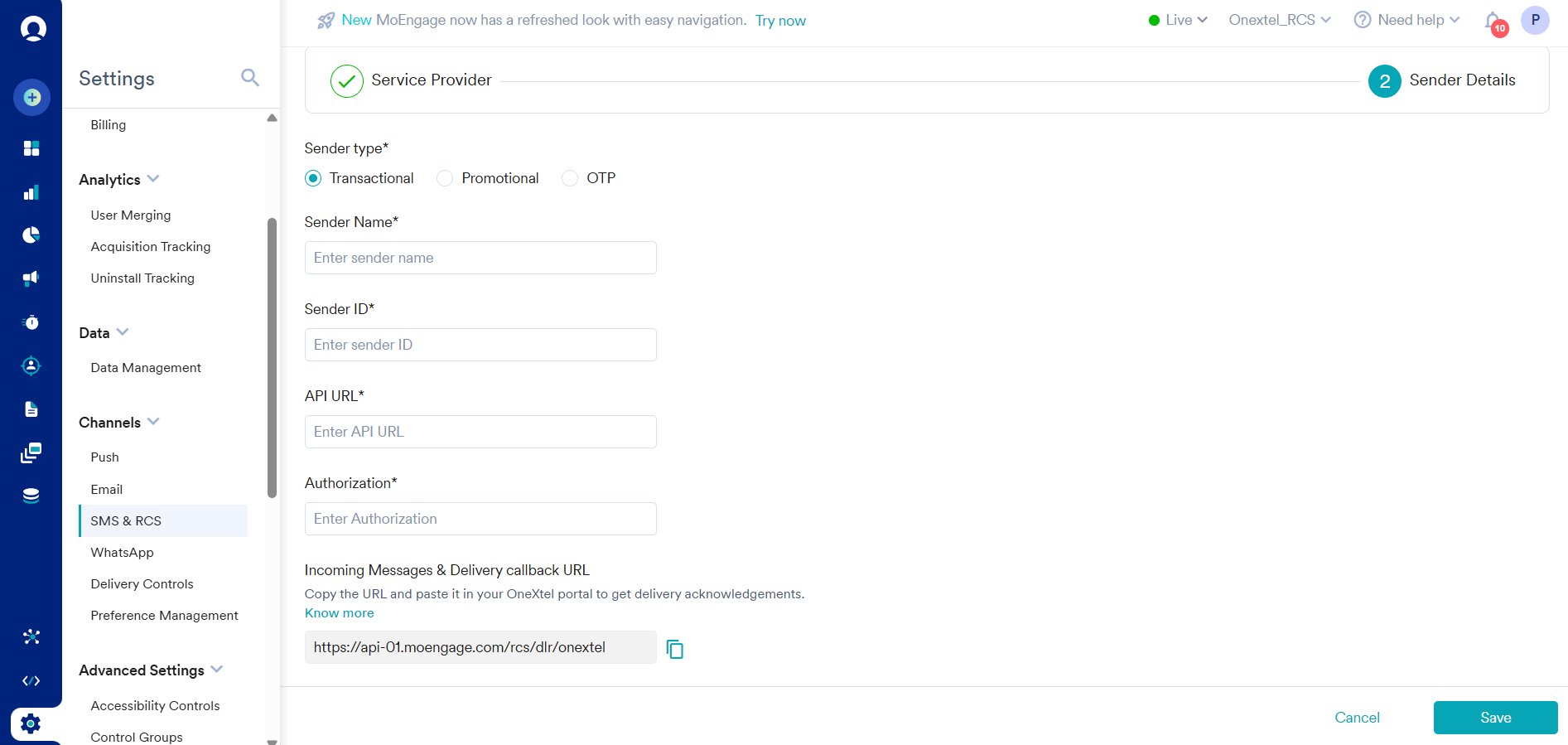
MoEngage RCS sender details. The callback URL shown is one region's host — yours may differ.
Name_Promotional        SenderID_Promotional
Name_Transactional      SenderID_Transactional
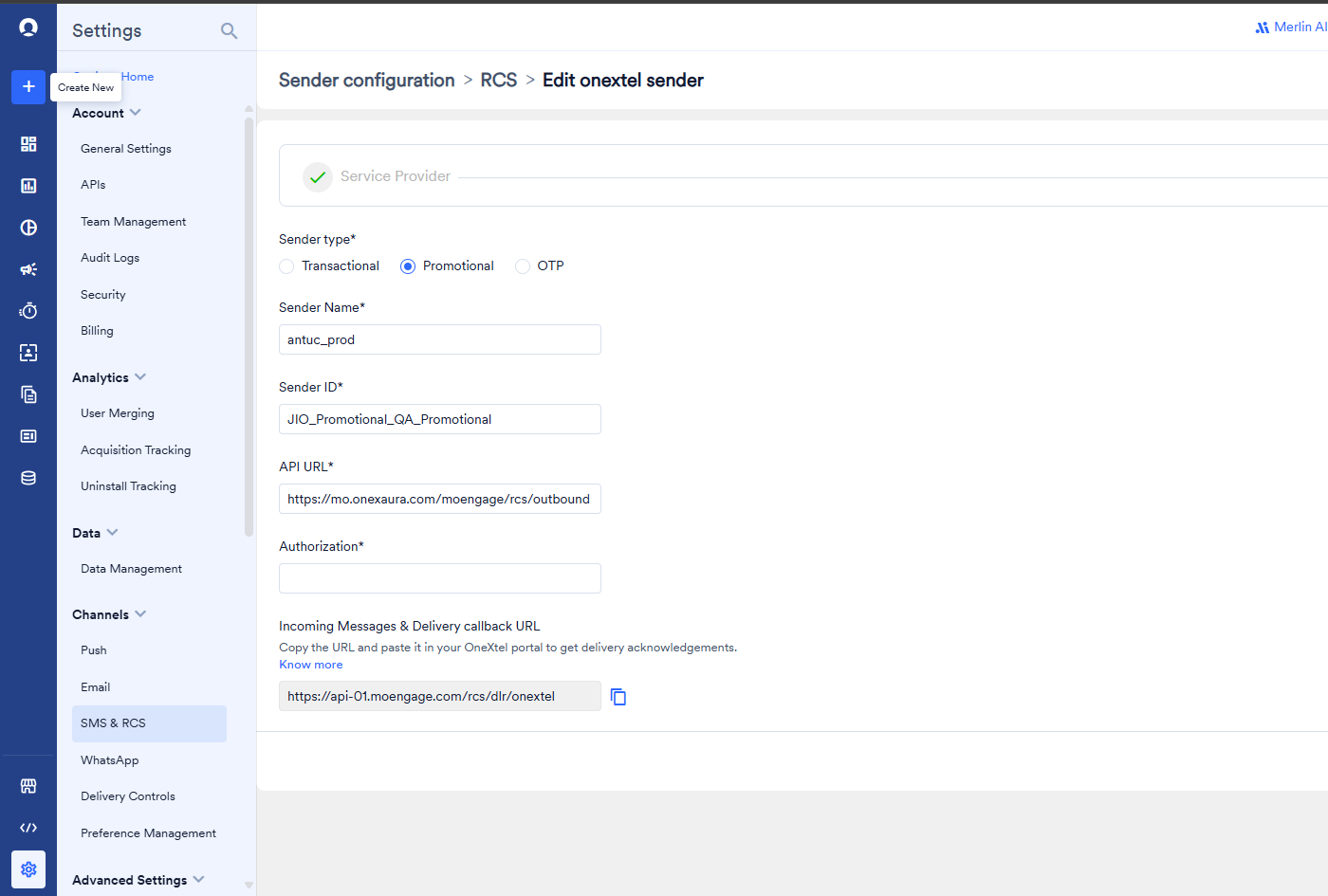
A completed RCS sender. The Authorization value is blanked here — see the Authorization step below for what goes in it with SMS fallback. The api-01 callback host is region-specific; copy yours from your own screen.
api-01, api-02, and so on. The screenshots in this guide show one
region’s host, which will not be yours unless you happen to share it. A wrong region is
accepted at save time and then silently never delivers a report.DC-01 to DC-06,
and each pairs dashboard-0N.moengage.com with api-0N.moengage.com. An account that
signs in at dashboard-03 has its callback URLs on api-03.Create the fallback configuration in OneXtel (SMS fallback)
Same Account. Leave its DLR URL at the default:
the SMS receipt then follows the SMS callback on your API key (Part D).
Save.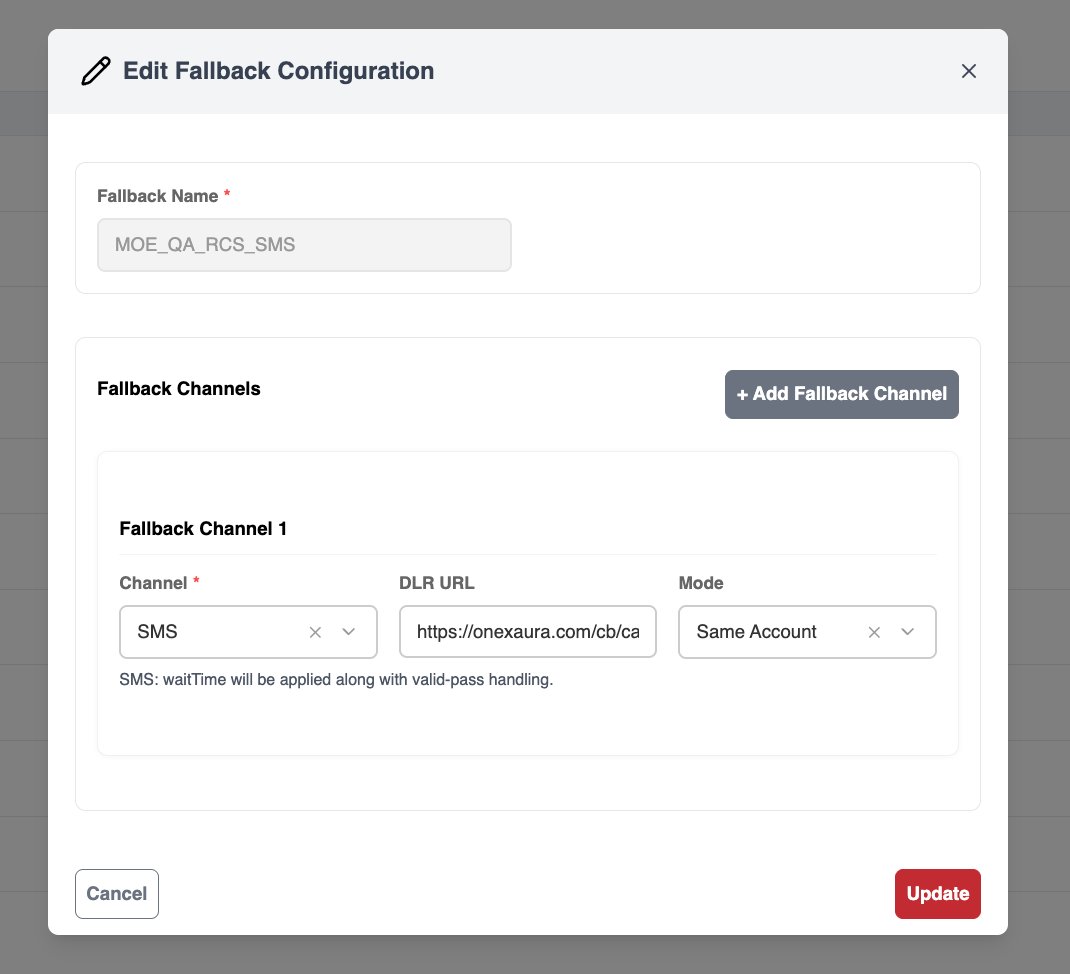
Creating an SMS fallback configuration in OneXtel
Set the RCS sender Authorization value
| You want | Authorization value |
|---|---|
| RCS only | <apikey> |
| RCS only, with a TTL | <apikey>~<ttl_Seconds> |
| RCS with SMS fallback | <apikey>~<ttl_Seconds>~<smsFallbackId>~<fallbackWaitTime_seconds>~<dltEntityId> |
<apikey>~<ttl_Seconds> is enough.For example, with SMS fallback:QkLuVxXI~60s~0004d861-8a30-47c3-90d4-c06eb391ec3a~90~1101234567890123456
| Value | What it is |
|---|---|
apikey | The API key already configured for this provider |
ttl_Seconds | How long operators keep trying to deliver the RCS message, in seconds with the s suffix — for example 60s. After this the message is marked failed. With fallback, see Choosing TTL and wait time |
smsFallbackId | The Fallback ID from the previous step |
fallbackWaitTime_seconds | How long OneXtel waits for an RCS delivery or failure report before sending the SMS, in seconds as a plain number — for example 90. Defaults to 30 if missing or not numeric |
dltEntityId | The DLT principal entity ID the fallback SMS is registered under. Leave it off when template auto-match is enabled on the API key — see Template ID and entity ID |
entityid, is
not used for RCS fallback, and the RCS sender form has no other field that could carry it.~. There is no separate
fallback section in the MoEngage form — this single field is the whole configuration, so a
missing value or a wrong separator disables fallback silently. Only the last value, the
entity ID, can be left off.| Setting | Example | What happens |
|---|---|---|
| TTL longer than wait time | 90s TTL, 60 wait | The wait time overrides the TTL. The RCS attempt ends when fallback fires at 60 seconds, so the recipient does not get both the RCS message and the SMS |
| TTL at or below wait time | 30s TTL, 60 wait | The RCS attempt stops at 30 seconds, but fallback still waits the full 60 seconds before the SMS goes out. The recipient waits for the whole wait time |
Add an SMS custom service provider in MoEngage (SMS fallback)
https://mo.onexaura.com/moengage/sms/outbound
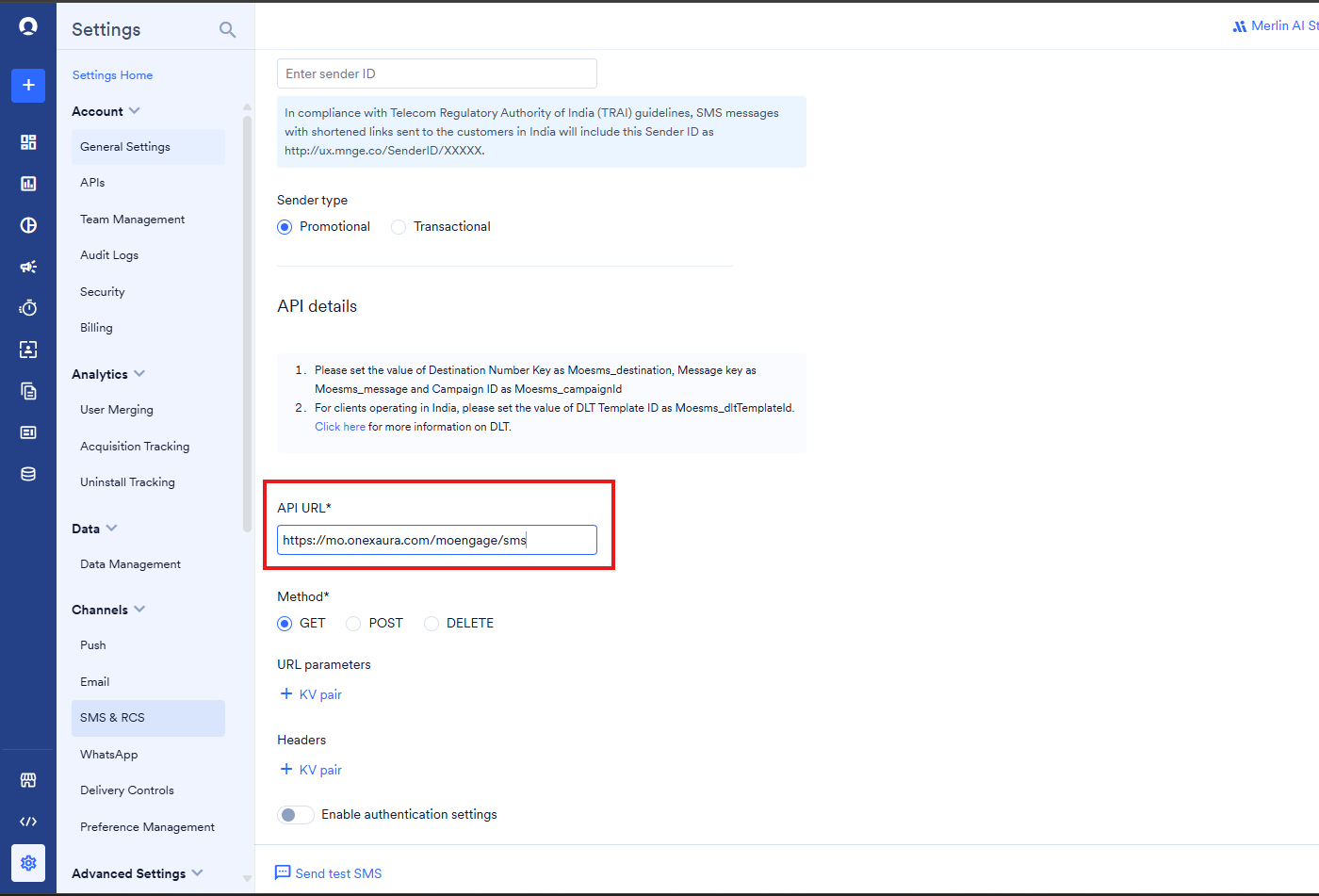
SMS custom service provider — the outbound URL must be on the same host as the RCS one
Set the SMS provider request body (SMS fallback)
POST, Body type to Raw, and paste:{
"key": "YOUR_API_KEY",
"from": "YOUR_SENDER_ID",
"to": "Moesms_destination",
"body": "Moesms_message",
"templateid": "Moesms_dltTemplateId",
"entityid": "YOUR_DLT_ENTITY_ID"
}
Moesms_ values are MoEngage macros and must be left exactly as written — MoEngage
substitutes them at send time. Replace from with your OneXtel sender ID, and entityid
with your DLT entity ID.If template auto-match is enabled on the API key, you can remove the templateid and
entityid lines. OneXtel then matches the message content to your registered DLT template
instead.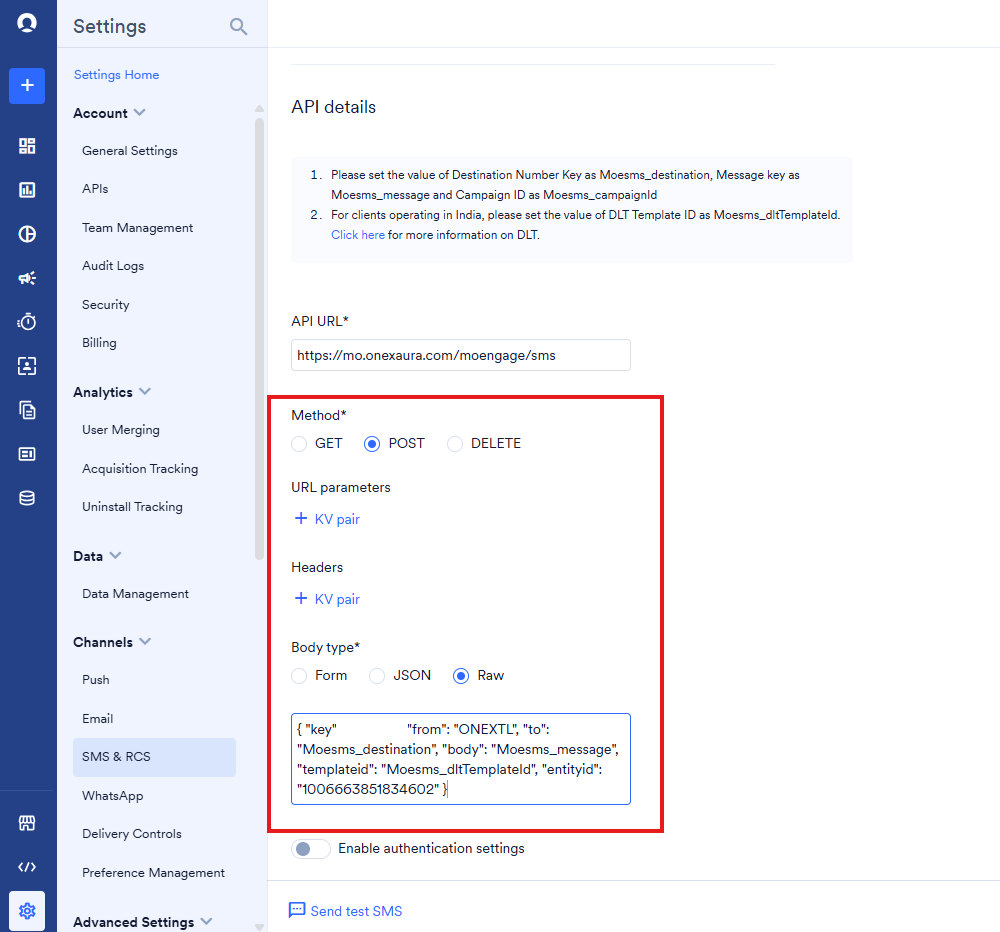
Method POST, body type Raw, and the request body
Part B — Create templates in MoEngage
Templates are built in OneXtel and recreated in MoEngage. Create the MoEngage template by selecting the matching Provider and Sender ID, then copy the message body across from the OneXtel dashboard.[custom_param] text in it.Your money transfer of Rs. [custom_param] was successfully completed.
Transaction ID: [custom_param1]. Thank you for using our service.
Your money transfer of Rs. {{custom_param}} was successfully completed.
Transaction ID: {{custom_param1}}. Thank you for using our service.
Part C — Build the campaign
Create the campaign and select the template
Enable fallback on the campaign (SMS fallback)
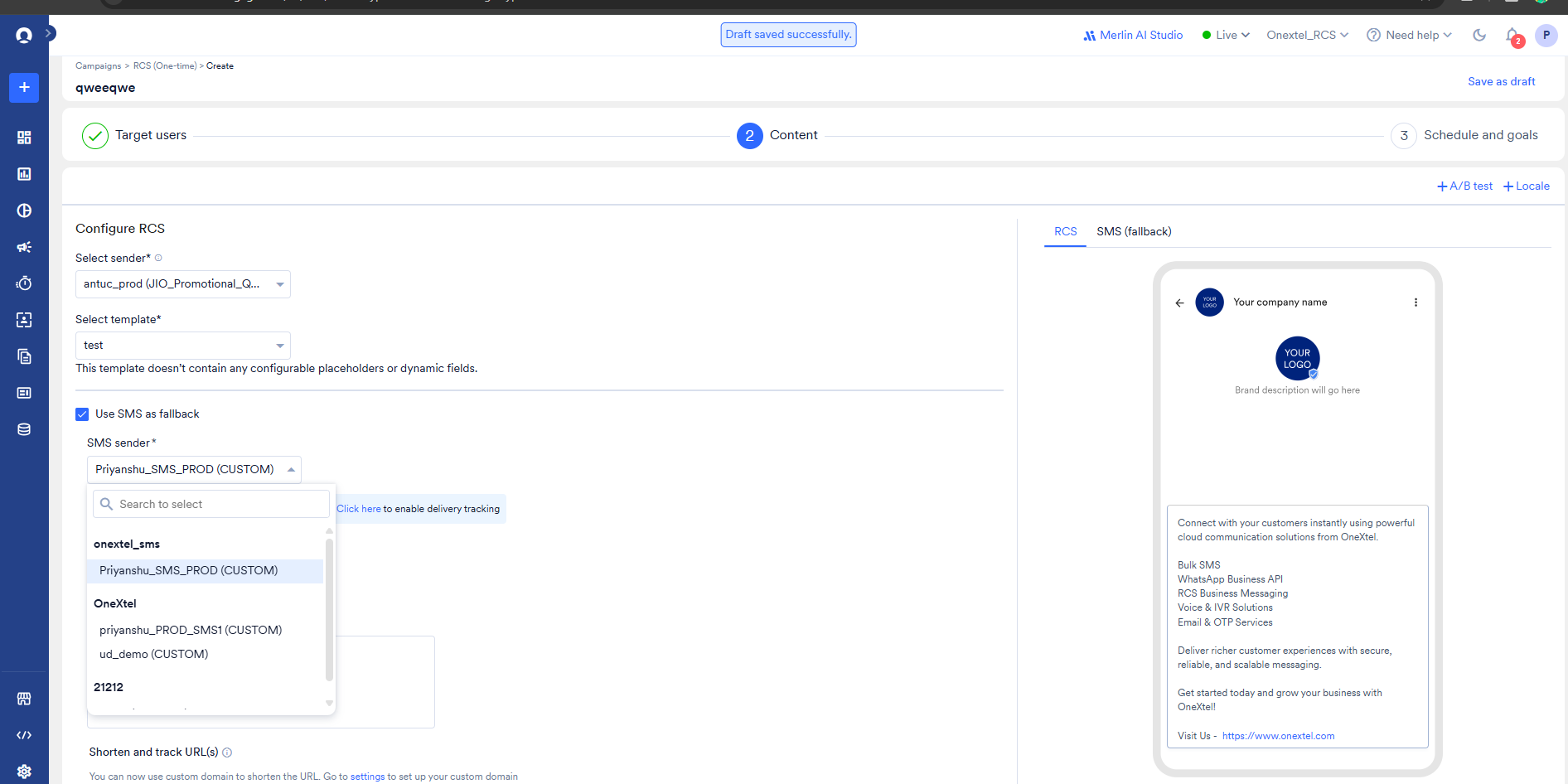
Campaign content step with SMS fallback enabled
Save without launching
Part D — Configure the callbacks before you send
Before you launch, create the callbacks in OneXtel that carry delivery reports and button clicks back to MoEngage. Each uses the same API key you entered in the MoEngage sender — callbacks are set per API key, so a sender on a different key does not pick them up.Configure the delivery report callback
RCS and Callback Format Type to MoEngage, and select the same API key you used
in MoEngage.Under Request Configuration, set Type to Delivery Notification and HTTP Method
to POST, and enter this URL:https://mo.onexaura.com/moengage/rcs/dlr
callback with the MoEngage callback URL you copied in
Part A as its value — the URL alone. Save.Do not paste the MoEngage URL into Callback URL directly. The report would bypass the
connector, and you would have no record of what OneXtel sent.
Callback Configuration — Add New Callback
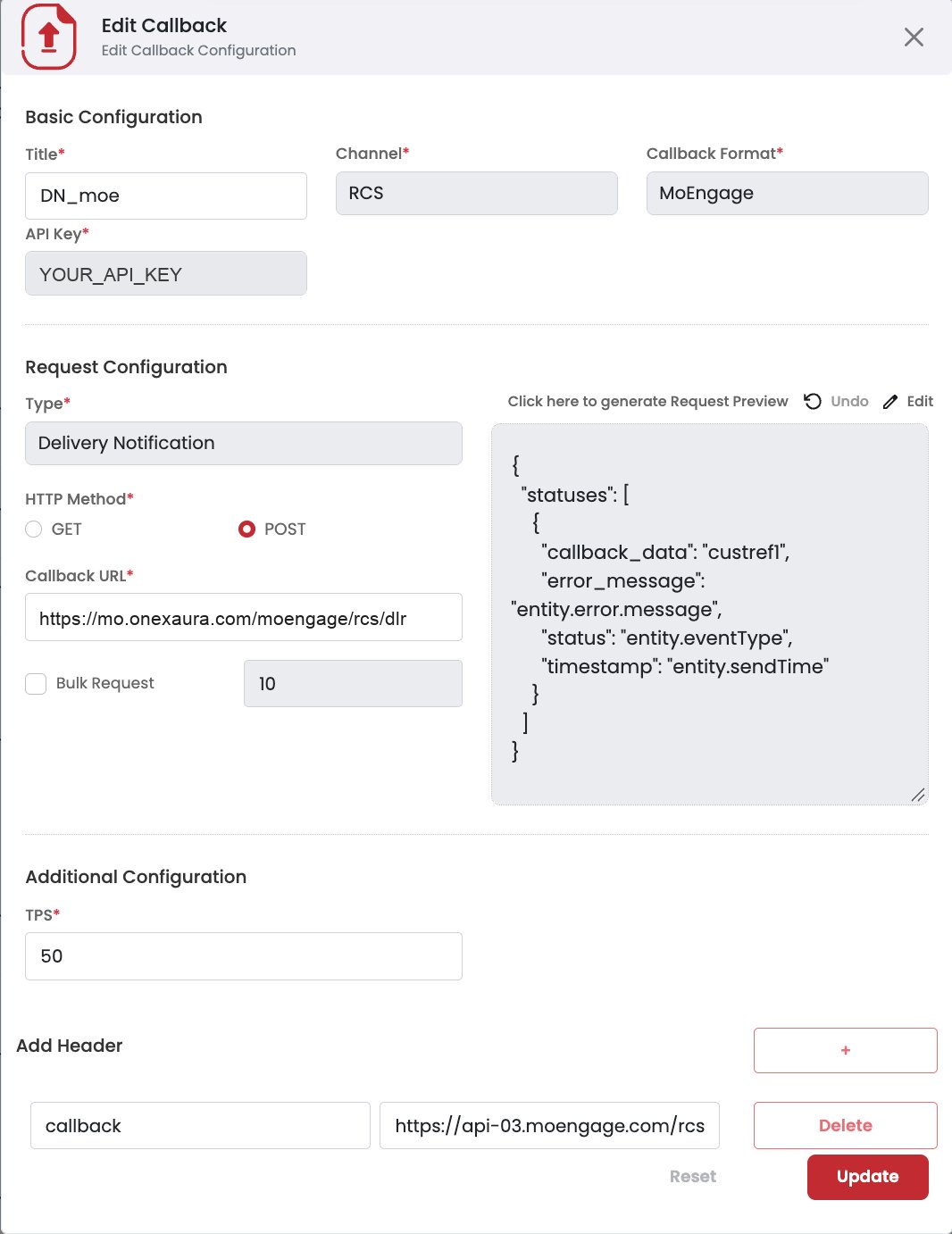
RCS delivery notification callback: the connector URL, and the MoEngage callback URL from your own sender screen in the callback header.
Configure the button-click callback
Button click and HTTP Method to POST, and enter this URL:https://mo.onexaura.com/moengage/rcs/inbound
callback with your MoEngage DLR URL as the value —
the same region-specific URL you copied from the sender screen, not one typed from this
page.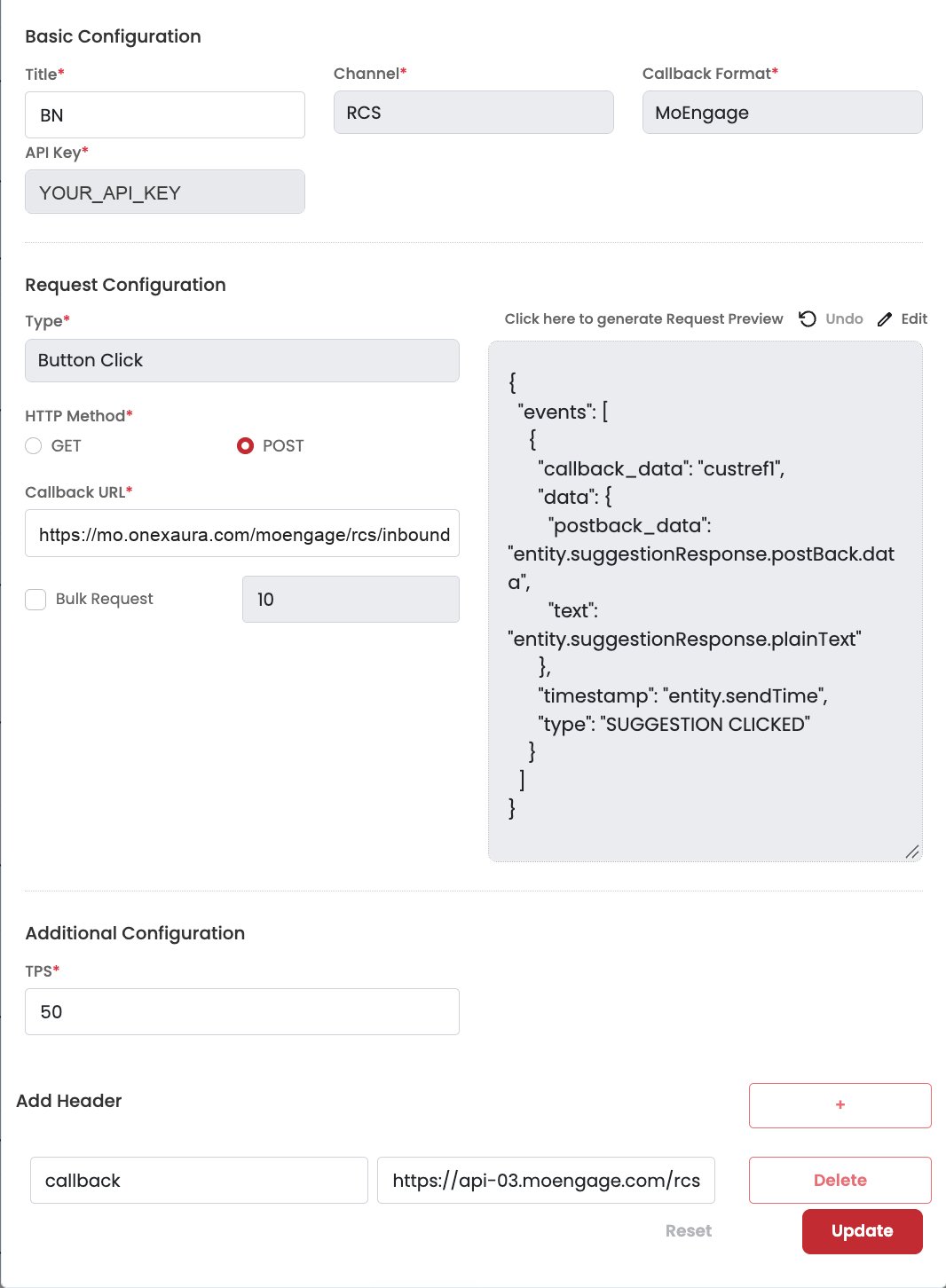
Button click callback — note the header at the bottom
Configure the SMS delivery callback (SMS fallback)
SMS, the same API key and HTTP Method POST. The SMS
callback form has no Callback Format field; it lists Default Parameters instead. The
connector translates OneXtel’s SMS receipt into MoEngage’s format:| Field | Value |
|---|---|
| Callback URL | https://mo.onexaura.com/moengage/sms/dlr |
| Default Parameters | keep the defaults, and make sure custref1 is included |
| Header | key callback, value = the RCS callback URL from the RCS sender screen (Part A) |
custref1 carries the reference of the RCS message the SMS replaced. Without it the connector
cannot tell a fallback receipt from a plain SMS one, and the report never reaches the RCS
campaign.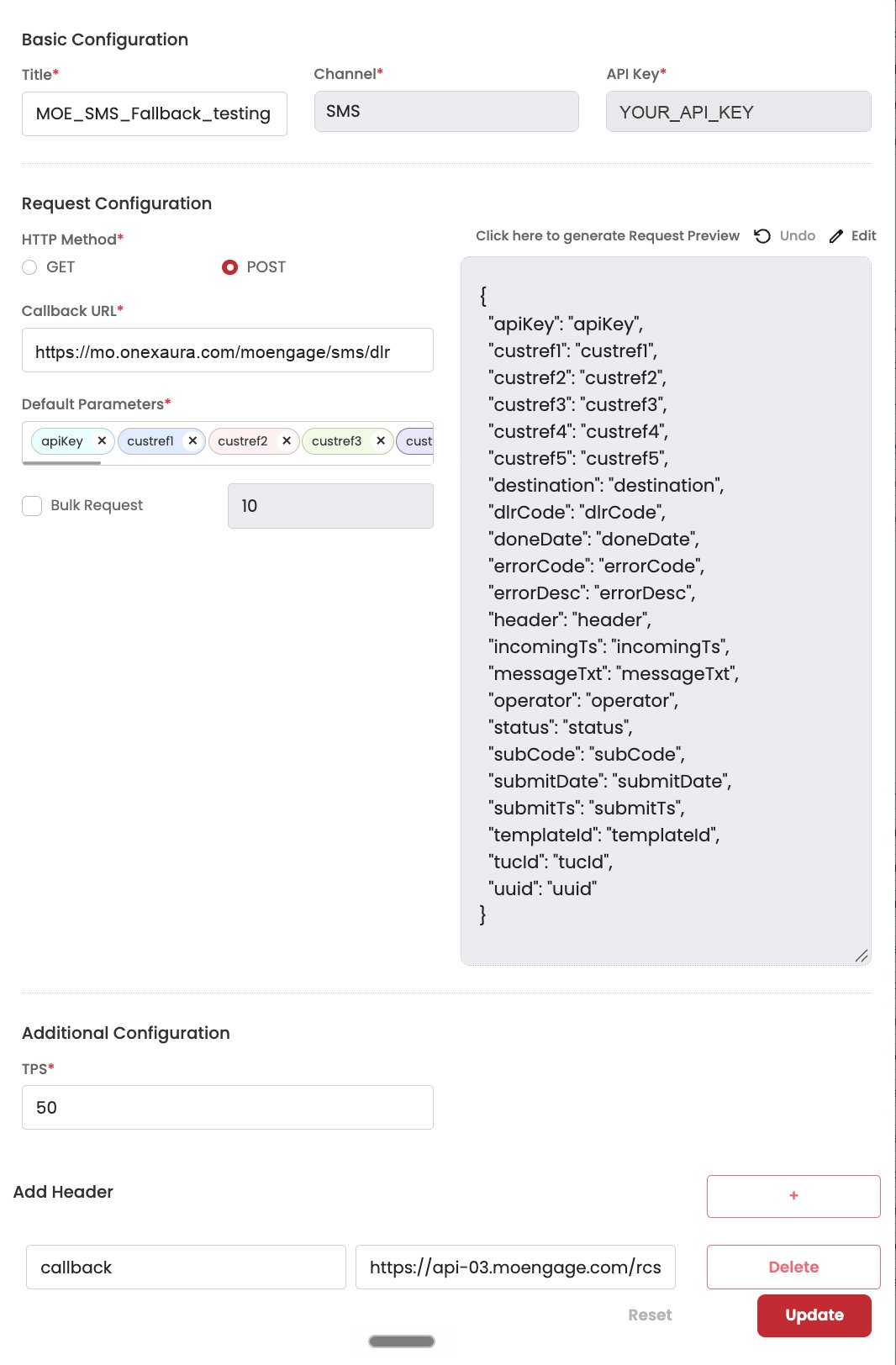
SMS delivery callback for RCS fallback — connector URL, default parameters including custref1, and the RCS callback URL in the header
SMS_DELIVERED
or SMS_DELIVERY_FAILED.callback_url; RCS and SMS use callback.
Put the URL alone in the value, not callback = ….
Using the wrong key silently breaks callback routing.Part E — Test, then launch
A fallback that is misconfigured does not stop the RCS send, so a successful campaign tells you nothing about whether fallback works. Test each path separately before you launch:Run a test message
Confirm RCS delivery
Confirm SMS fallback
Launch
Part A — Add OneXtel as an SMS provider
Get your OneXtel API key
Add a custom service provider
https://mo.onexaura.com/moengage/sms/outbound
SMS custom service provider — the connector's SMS URL
Set the request body
POST, Body type to Raw, and paste. MoEngage selects Form by
default, so change it before you paste:{
"key": "YOUR_API_KEY",
"from": "YOUR_SENDER_ID",
"to": "Moesms_destination",
"body": "Moesms_message",
"templateid": "Moesms_dltTemplateId",
"entityid": "YOUR_DLT_ENTITY_ID"
}
Moesms_ values are MoEngage macros and must be left exactly as written — MoEngage
substitutes them at send time. Replace key with your API key, from with your OneXtel
sender ID, and entityid with your DLT entity ID.You can add these optional fields to the same body:| Field | Value | Notes |
|---|---|---|
type | SI, OTP or SE | The DLT category your templates are registered under. Case-sensitive; defaults to SI |
unicode | "1" | For messages with non-ASCII characters. Not detected for you |
campaignName | "Moesms_campaignId" | Tags each SMS with the MoEngage campaign in OneXtel reporting |
urlTracking | "1" | Turns click tracking on for this provider. Leave it out and your links are sent untouched |
7001 rather than send the wrong ID.templateid and
entityid lines. OneXtel then matches the message content to your registered DLT template
instead.apikey header instead of the body, if your MoEngage form has a
headers section. When both are set, the body wins.Method POST, body type Raw, and the request body
Decide on click tracking
"urlTracking": "1" to the request body to turn it on: OneXtel then rewrites
every link in the SMS into its own short domain and counts the taps, which you see in OneXtel
reporting."1", "true", "yes" and "on" turn tracking on. Anything else, including a missing
or misspelled value, leaves your links untouched. RCS messages and RCS fallback SMS are never
shortened.Tell MoEngage how to read the replies
messageId:| MoEngage field | Value |
|---|---|
| Attribute storing unique ID of the sent response | messageId |
| Attribute storing Unique delivery ID field of delivery response | messageId |
| Attribute storing delivery status | status |
| Success values for delivery status | delivered |
| Attribute storing failure reason | errorCode |
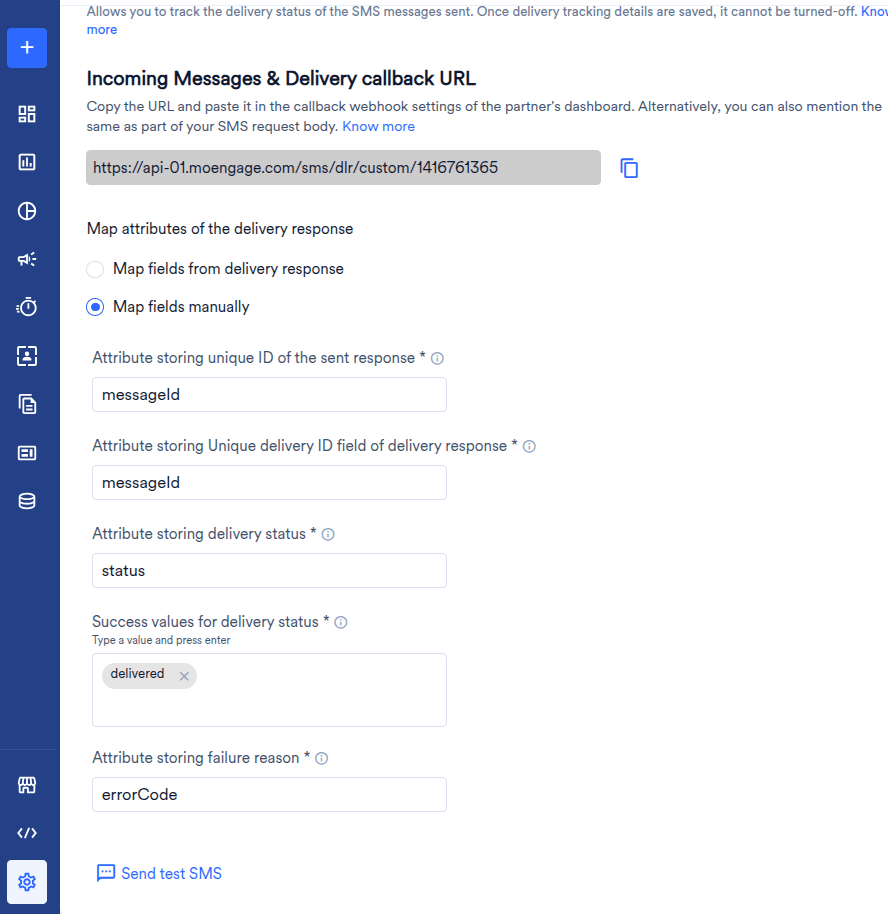
Delivery tracking on the SMS provider, mapped manually. The callback URL at the top is the one you copy in the next step.
401 or 400, with status set to
failure and an errorCode from 7000 to 7004 — see Error code mapping.Save, then copy the SMS delivery tracking URL
https://api-0N.moengage.com/sms/dlr/custom/<id>. Copy it — you paste it into OneXtel in
Part B.api-0N host matches the data centre
of your MoEngage dashboard, and the ID at the end belongs to the provider (connector): senders
under one connector share it, but another connector in the same workspace has a different ID.
A URL copied from another account or connector is accepted at save time and then silently
never credits a report.Part B — Configure the SMS delivery callback
In OneXtel, go to Configuration → Add New Callback and add a callback with the same API key you put in the provider body:| Field | Value |
|---|---|
| Channel | SMS |
| HTTP Method | POST |
| Callback URL | https://mo.onexaura.com/moengage/sms/dlr |
| Default Parameters | keep the defaults (apiKey, custref1–custref5, destination, status, errorCode, …) |
| Header | Key callback, value = the SMS delivery tracking URL from Part A, and nothing else |
callback header, your reports do not reach your MoEngage account. Check the
header on this callback specifically, and never save it with an empty header row.The header value is the URL alone, for example
https://api-01.moengage.com/sms/dlr/custom/2612531631. Do not type callback = … into the value
field. MoEngage answers every report with success, even one it cannot match, so a wrong value is
only visible as a Delivered count that stays at zero.Part C — Build the SMS campaign
Create the campaign
Write the message and set the DLT template ID
Moesms_dltTemplateId. It
can be left empty only if template auto-match is enabled on the API key.Save without launching
Part D — Send a test SMS, then launch
Send a test SMS
Confirm the send was accepted
messageId. A failure reply carries a 7000–7004 code
instead.Confirm delivery
Launch
callback_url; RCS and SMS use callback.
Using the wrong one silently breaks callback routing.Error code mapping
MoEngage’s SMS and WhatsApp providers use five failure codes. The connector returns them on send replies, and — for SMS — on every delivery report:| Code | MoEngage meaning |
|---|---|
7000 | Invalid credentials |
7001 | Invalid template parameters |
7002 | Invalid phone number |
7003 | Phone number not subscribed to receiving messages |
7004 | Any other error |
- WhatsApp
- RCS
- SMS
| Situation | MoEngage code |
|---|---|
| No Authorization value on the sender | 7000 |
from or to missing from the payload | 7002 |
| Message ID, template or template name missing from the payload | 7004 |
| OneXtel refused the request — including a rejected API key | 7004 |
/moengage/rcs/dlr. Through the connector, a delivery is
RCS_DELIVERED, a read RCS_READ, a sent-only event RCS_SENT (never counted as delivered), and
a failure RCS_DELIVERY_FAILED with OneXtel’s reason. For what an operator code means, see
RCS error codes. Button clicks go through the connector and reach
MoEngage as SUGGESTION_CLICKED events.Send repliesRCS replies carry a status per message rather than a numbered code:| Situation | Reply |
|---|---|
| Accepted | SUCCESS |
| No API key in the Authorization value | FAILURE — Invalid credentials |
| No messages in the payload | FAILURE — Invalid payload |
| OneXtel refused the request | FAILURE — with the HTTP error OneXtel returned |
SMS_DELIVERED or SMS_DELIVERY_FAILED against the original RCS message.delivered only when OneXtel’s code is 000. Every other code is reported as
failed, with a MoEngage code:| MoEngage code | OneXtel codes | What they have in common |
|---|---|---|
7002 | 108, 115, 142, 143, 972 | The number is invalid or unknown |
7003 | 109, 218, 974, 976, 978 | The number is on DND or a blacklist |
7001 | 107, 131, 141, 201, 203–211, 213–216, 220, 222, 223, 225–227, 971, 975, 977, 979–981, 989 | Sender ID, DLT registration or content problems |
7000 | 990–993 | The sending account is disabled or expired |
7004 | Every other code — for example an absent handset, network congestion, expiry, 982 no balance or 987 credit limit | Anything else |
111 (delivery awaited), and the SUBMITTED receipt OneXtel
posts when it hands the SMS to the operator. MoEngage only ever sees the final report, so a
message still in flight is never counted as failed. For what each OneXtel
code means, see India SMS error codes.Send repliesEvery accepted send gets HTTP 200 with status: "success" and a messageId. A refused send gets
HTTP 401 (code 7000) or 400 (every other code), with status: "failure", an errorCode and a
description:| Situation | MoEngage code |
|---|---|
| No API key in the body or headers, or OneXtel rejected it | 7000 |
to missing, or OneXtel rejected the recipient | 7002 |
from or body missing; an invalid type; an ID sent as a bare number; or OneXtel rejected the template, entity or DLT details | 7001 |
| Any other rejection | 7004 |
7003 is never returned on a send — only on a delivery report. OneXtel’s own reason is always in
description.7000–7004 code and the description are in the reply body, not in MoEngage’s
report.Limitations
All channels- Template name and template ID must both match exactly between MoEngage and OneXtel. A change to either on either side breaks the send.
- Variable names must match the keys in the message payload.
- Callbacks time out after 5 seconds and are retried up to three times. If MoEngage does not acknowledge within that window, the callback is dropped rather than queued for later redelivery.
- WhatsApp
- RCS
- SMS
- Quick Reply or CTA, not both. MoEngage does not support templates combining quick-reply and call-to-action buttons.
- Static button data is not included in the MoEngage payload.
- Click events are not available. MoEngage exposes no API to receive them, so link clicks cannot be written back into MoEngage reporting. Use OneXtel reporting for click data.
- Inbound messages are not supported by MoEngage. Suggestion interaction callbacks are returned, but free-form customer replies cannot be surfaced in MoEngage.
- Only template names and parameters are passed to OneXtel — the template body itself is resolved on the OneXtel side.
- Audio and PDF are not supported by MoEngage on RCS.
- Carousel templates are not yet available — see Coming soon.
- Inbound SMS is not supported. Replies to an SMS are not relayed to MoEngage.
- India DLT traffic. The connector sends to OneXtel’s India platform. Numbers are passed as
MoEngage supplies them, so store them with the country code —
91XXXXXXXXXX. unicodeis not detected for you. Add it to the request body when your templates use non-ASCII characters.- Delivery awaited is not reported. MoEngage sees a message only once it has a final outcome.
- Delivery reports go through the connector, never straight to MoEngage. OneXtel posts each
receipt to
https://mo.onexaura.com/moengage/sms/dlr, and the connector translates it and forwards it to the MoEngage URL in the callback’scallbackheader. A callback pointed at the MoEngage URL directly is accepted by MoEngage but never matched to a message.
Get support
If a campaign does not behave as this page describes, email omni.tech@onextel.com with the plugin name (MoEngage), the channel, and what you saw. To let OneXtel see exactly what MoEngage sent and what OneXtel answered:Ask for the logging endpoint
Point the sender at it
Run the campaign again
Share the campaign ID